ABT01 Workbench — Start
Start designing
How it works — Guide
ABT01.com · How it works

How to use the apps

Every generator follows the same path: choose an app, configure or import, preview, export, then prepare the file for your machine. Sizes in the tools are millimetres unless a field says otherwise.
Shared workflow

Shared workflow

  1. Choose an app — Open a generator from Tools or a software from Softwares.
  2. Configure or import — Enter text and sizes (mm), or import a file where the tool supports it (photos, STL, OpenSCAD export, maps).
  3. Preview — Use the live 2D/3D view. Orbit and check proportions before you export.
  4. Export — Download the formats the tool lists (STL, 3MF, SVG, DXF, PDF, G-code). Nothing is uploaded to ABT01 for making.
  5. Machine preparation — Slice STLs in your printer software; load SVG/DXF into LightBurn, VCarve, a plotter driver, etc. Apply kerf, bed size and material settings on your machine.
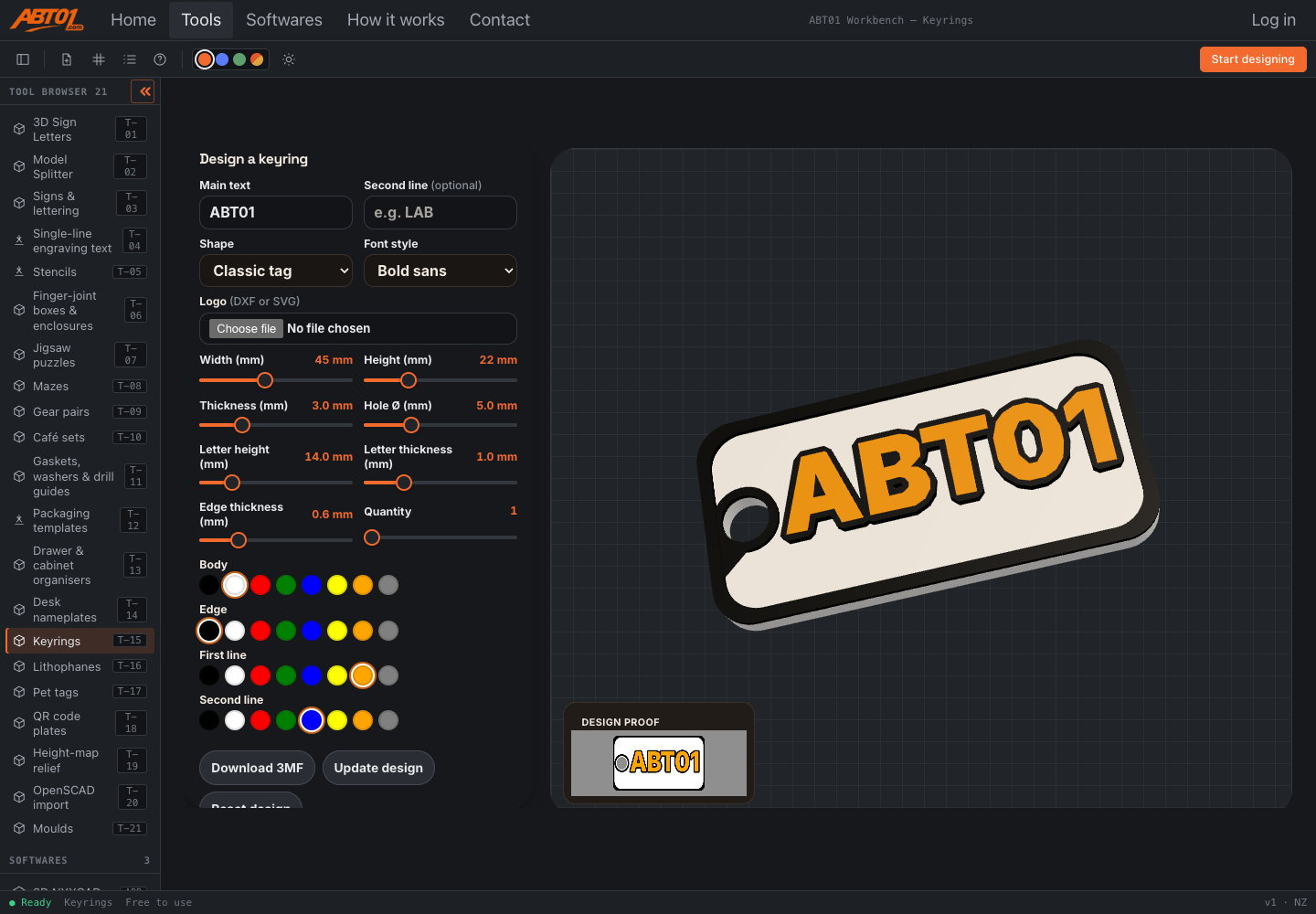
Keyrings tool open in ABT01 Workbench showing form controls and a 3D preview
Example: Keyrings — form on the left, live 3D preview on the right.
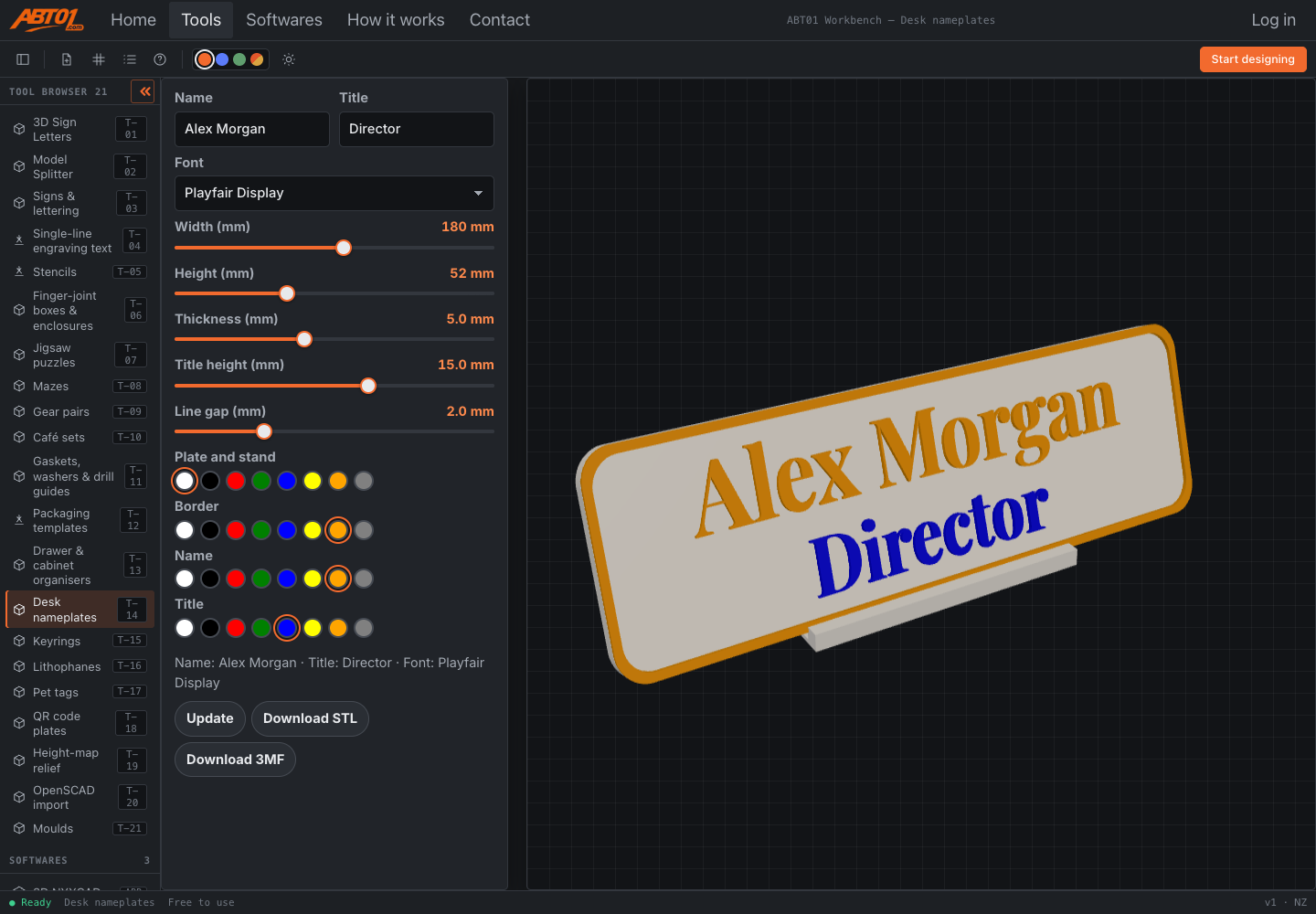
Desk nameplates tool with charcoal workbench chrome and orange accent controls
Example: Desk nameplates — same Workbench chrome around every generator.
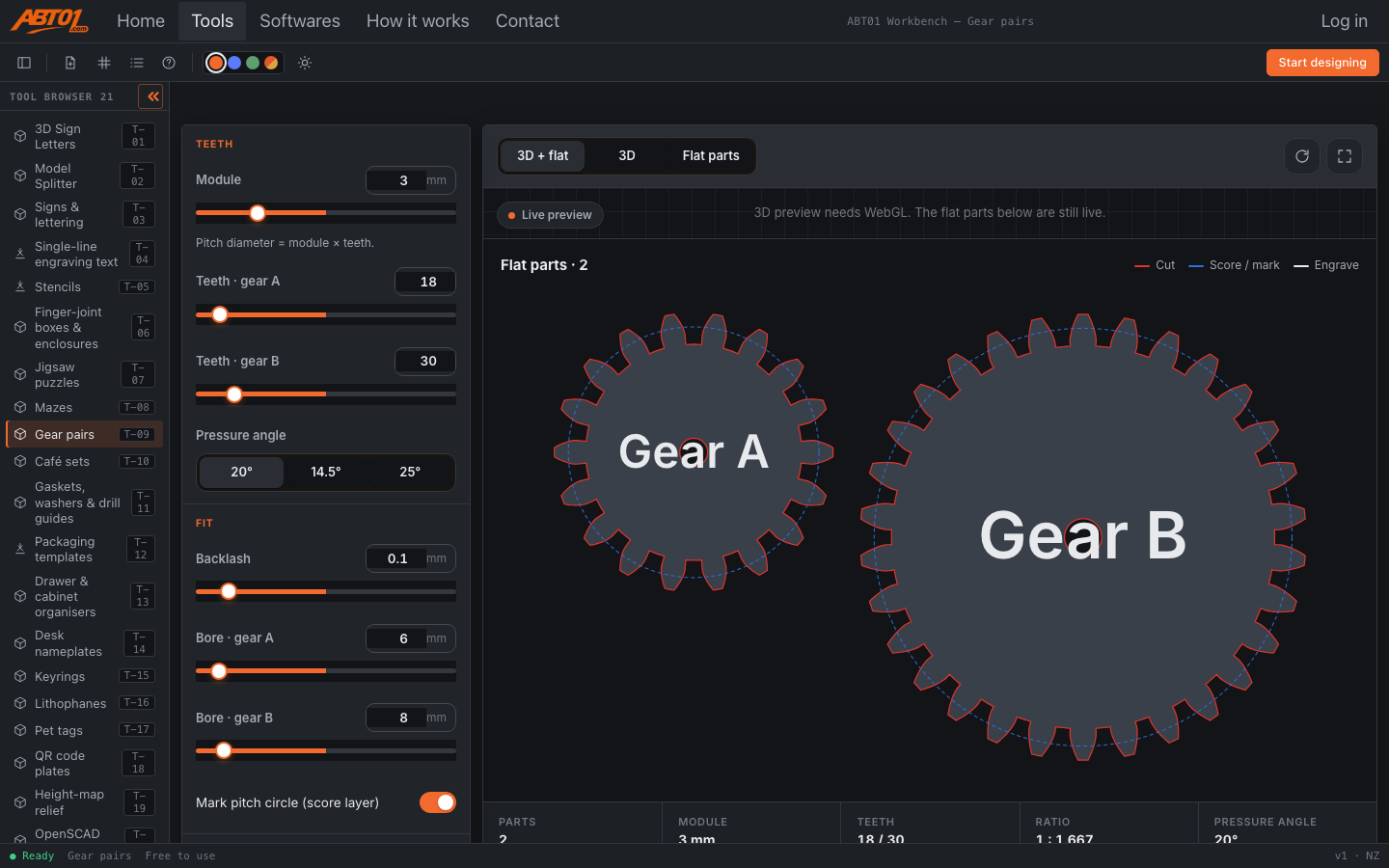
Gear pairs tool preview in the workbench
Example: Gear pairs — engineering generator with live mesh preview.
Practical notes

Safety & limits

  • Cutting & printing safety: follow your machine’s manual. Use eye protection for lasers/CNC; never leave cutters unattended; ventilate for fumes; keep clear of moving axes.
  • Kerf & tolerance: finger-joint boxes and stencils expose kerf or bridge settings where implemented. Always cut a small test in your material.
  • Units: tool fields use millimetres. Confirm your CAM/slicer is also in mm.
  • OpenSCAD import: opens exported solids / STL and can write STL or OpenSCAD. It does not pretend to compile arbitrary OpenSCAD libraries.
  • Height-map relief: uses the offline sample area available in the tool, not a live global map service.
  • Privacy: designs stay in your browser for download. The contact form on this local copy saves a receipt on the machine only.
Guides · 20 tools

Tool guides

Expand a card for steps, formats and an Open link. Thumbnails match the Tools catalogue.

Letters, signs & engraving

3D preview card for Signs & lettering Signs & letteringBusiness · Retail · Events · Export ALL

Choose plate or letter style, set size in mm, pick machine export (SVG/DXF/STL as offered), preview, download. Good starting point for shop and event signs.

Plates, layered and cut letters in every format.

Machines: 3d · laser · cnc · plot · biz · giftExport: ALL

Open Signs & lettering

3D preview card for Single-line engraving text Single-line engraving textPlotters · Engravers · Export SVG·GCODE

Enter text, choose a stroke font, set height, preview the single-line paths, export SVG or G-code. Designed for pens and light engraving—not filled outline fonts.

Stroke fonts for pen plotters and fast engraving.

Machines: laser · cnc · plot · biz · giftExport: SVG·GCODE

Open Single-line engraving text

3D preview card for Stencils StencilsSignage · Crafts · Export SVG·DXF

Type text or add shapes; bridges are kept so islands stay attached. Export SVG/DXF for laser or CNC. Check bridge width against your material kerf.

Text and shapes with automatic bridges.

Machines: laser · cnc · plot · biz · eduExport: SVG·DXF

Open Stencils

3D preview card for Café sets Café setsHospitality · Export SVG·STL

Pick menu / table number / coaster layouts, enter text, size in mm, export SVG or STL for your machine.

Menus, table numbers and coasters.

Machines: 3d · laser · cnc · bizExport: SVG·STL

Open Café sets

3D preview card for Packaging templates Packaging templatesBusiness · Retail · Export SVG·PDF

Choose a box style, set dimensions, preview the dieline (cut vs fold), export SVG or PDF. Score folds; cut through only on cut lines.

Dielines with cut and fold lines.

Machines: laser · cnc · plot · bizExport: SVG·PDF

Open Packaging templates

Boxes, organisers & cut parts

3D preview card for Finger-joint boxes & enclosures Finger-joint boxes & enclosuresLaser · CNC · Export SVG·DXF·STL

Set outer size, material thickness and kerf in mm, choose lid options, preview joints, export SVG/DXF for flat cut or STL where offered. Always cut a small kerf test first.

Matching finger joints, kerf and lid options.

Machines: 3d · laser · cnc · biz · gift · eduExport: SVG·DXF·STL

Open Finger-joint boxes & enclosures

3D preview card for Drawer & cabinet organisers Drawer & cabinet organisersHome · Workshop · Export STL·SVG

Measure your drawer (mm), set pocket layout, preview, export STL to print or SVG to cut dividers.

Pockets sized to your drawer, printed or cut.

Machines: 3d · laser · cnc · biz · giftExport: STL·SVG

Open Drawer & cabinet organisers

3D preview card for Jigsaw puzzles Jigsaw puzzlesGifts · Education · Export SVG·STL

Set rows/columns, tab size and seed, preview pieces, export SVG for laser/CNC or STL to print. Same seed recreates the same cut pattern.

Pieces, tab size and seed; cut or print.

Machines: 3d · laser · cnc · gift · eduExport: SVG·STL

Open Jigsaw puzzles

3D preview card for Mazes MazesEducation · Gifts · Export SVG·STL

Choose maze size and wall style, preview, export SVG or STL. Wall thickness should be larger than your cutter kerf or nozzle width.

Perfect mazes, cut walls or marble mazes.

Machines: 3d · laser · cnc · plot · gift · eduExport: SVG·STL

Open Mazes

3D preview card for Gaskets, washers & drill guides Gaskets, washers & drill guidesWorkshop · Export DXF·STL

Enter inner/outer diameters and bolt circle data in mm, preview, export DXF or STL. Verify hole sizes against your fasteners before cutting.

ID/OD, bolt circles, guide plates.

Machines: 3d · laser · cnc · plot · bizExport: DXF·STL

Open Gaskets, washers & drill guides

3D preview card for Gear pairs Gear pairsEngineering · Export STL·DXF

Set tooth count, module and thickness, preview meshing gears, export STL or DXF. Keep the same module on both gears so they mesh.

True involute gears that mesh.

Machines: 3d · laser · cnc · biz · eduExport: STL·DXF

Open Gear pairs

3D gifts & plates

3D preview card for Desk nameplates Desk nameplates3D printing · Office · Export STL·3MF

Enter name text, set plate size and letter height, assign body/letter colours, preview, download STL or multi-colour 3MF for AMS-style printers.

A desk plate in up to 4 colours.

Machines: 3d · biz · giftExport: STL·3MF

Open Desk nameplates

3D preview card for Keyrings Keyrings3D printing · Gifts · Export STL·3MF

Pick a shape, enter main/second line text, set size and colours, preview, export STL/3MF. Leave clearance around the ring hole for your hardware.

A name on a ring, up to 4 colours.

Machines: 3d · giftExport: STL·3MF

Open Keyrings

3D preview card for Lithophanes Lithophanes3D printing · Photos · Export STL·3MF

Upload a photo, choose mono or colour mode, set size and thickness, preview the relief, export STL or 3MF. Print with a light behind for best effect; keep thin walls within your printer’s limits.

A photo that glows: mono or full colour (multi-filament 3MF).

Machines: 3d · giftExport: STL·3MF

Open Lithophanes

3D preview card for Pet tags Pet tags3D printing · Pets · Export STL·3MF

Choose a tag shape, add pet name / owner lines or QR, set colours, preview, export STL/3MF. Check collar ring hole size before printing.

A tag with a name, owner lines or a QR code.

Machines: 3d · giftExport: STL·3MF

Open Pet tags

3D preview card for QR code plates QR code plates3D printing · Business · Export STL·3MF

Paste the URL or text, set plate size and colours, preview the raised code, export STL/3MF. Test-scan a printed sample before a large run.

A raised QR code in up to 4 colours.

Machines: 3d · bizExport: STL·3MF

Open QR code plates

Models, maps & moulds

3D preview card for Model Splitter Model Splitter3D printing · Big models · Export STL

Import an STL/OBJ/3MF/GLB, draw or place cuts, add pins if needed, preview parts, then export printable STL pieces. Use when a model is larger than your bed or needs assembly.

Split big or AI-generated models into printable parts with pins.

Machines: 3dExport: STL

Open Model Splitter

3D preview card for Height-map relief Height-map relief3D printing · Maps · Export STL

Pick the available map area, set size and height exaggeration, preview the terrain, export STL. This build uses the offline sample region—do not expect live worldwide map tiles.

Terrain relief from elevation data (offline sample area).

Machines: 3d · edu · giftExport: STL

Open Height-map relief

3D preview card for OpenSCAD import OpenSCAD import3D printing · CAD · Export STL·3MF

Open an exported OpenSCAD/FreeCAD solid or an STL. The tool previews the solid in millimetres and can write STL or OpenSCAD. It works with exported solids—it does not compile full OpenSCAD programs with arbitrary libraries.

Open a FreeCAD/OpenSCAD export as a printable solid.

Machines: 3d · eduExport: STL·3MF

Open OpenSCAD import

3D preview card for Moulds Moulds3D printing · Casting · Export STL

Choose mould type, set cavity size and wall thickness, preview the mould halves, export STL. Follow material safety for silicone/resin; leave vents and pour spouts as the tool provides.

Silicone, pottery slip or fishing-lure moulds.

Machines: 3d · bizExport: STL

Open Moulds

Softwares

Softwares

3D Sign Letters software preview

3D Sign Letters

LED sign letters with a cover, an LED or neon channel base and an acrylic face. Set the size in millimetres, preview the parts, then download STL, 3MF, DXF or SVG. Large letters can be split to the printer bed.

Export: STL·3MF·DXF·SVG

Open 3D Sign Letters
3D NYXCAD modelling software preview

3D NYXCAD

Browser 3D modelling. Sketch and model, then export STL, 3MF or STEP for printing or further CAD.

Export: STL·3MF·STEP

Open 3D NYXCAD
ABT01 Vector editor preview

ABT01 Vector

Draw, weld and nest for laser, CNC or vinyl. Export SVG, DXF, PDF or G-code when you need freeform paths beyond a generator.

Export: SVG·DXF·PDF·GCODE

Open Vector
STL Splitter software preview

STL Splitter 2.2.46

Split large or AI-generated STL/OBJ/3MF/GLB models into printable parts with pins and drawn cuts. Also listed as the Model Splitter tool.

Export: STL·3MF

Open Splitter
Lightbox software preview

Lightbox

Printable light boxes with a colour, solid or lithophane front. The face and walls are one solid shell, with a separate back cover. Set any size in millimetres, then download STL, 3MF, DXF or SVG.

Export: STL·3MF·DXF·SVG

Open Lightbox

Browse all tools Ask a question

● ReadyHow it worksAll liveFree to use v1 · NZ